.png)
Check-In Customers on your phone
Digital Check-ins allow you to check in customers without printing paper rosters. Simply share a special link with your staff, and they can mark attendees as arrived directly from their phone or tablet. All updates sync immediately to your Workspace.
Who is digital check-in for?
- Businesses who want to go paperless
- Businesses who have seasonal/ young staff without access to Occasion's Workspace
In this article, you will cover:
- What is the Benefit of the Digital Check-in?
- How do i share the Digital Check-in link with staff?
- How do staff check in attendees?
- Common Questions
What is the Benefit of the Digital Check-in?
Digital Check-ins eliminate the time-consuming process of printing attendee lists, distributing them to staff, and manually analyzing them afterward to see who attended.
Key benefits include:
- No printing required - Save time and resources by going paperless
- Real-time updates - All check-ins sync immediately to your Workspace
- No login required - Staff don't need an Occasion account to check in guests
- Fast access to information - View the full list of attendees instantly
- Reduced errors - Eliminate mistakes from manual data entry and miscommunication
- Perfect for seasonal staff - Share the link with temporary staff without giving them full Workspace access
How do I share the Digital Check-in link with staff?
The Digital Check-in link is only accessible when you share it. No one can access your attendee information without the link.
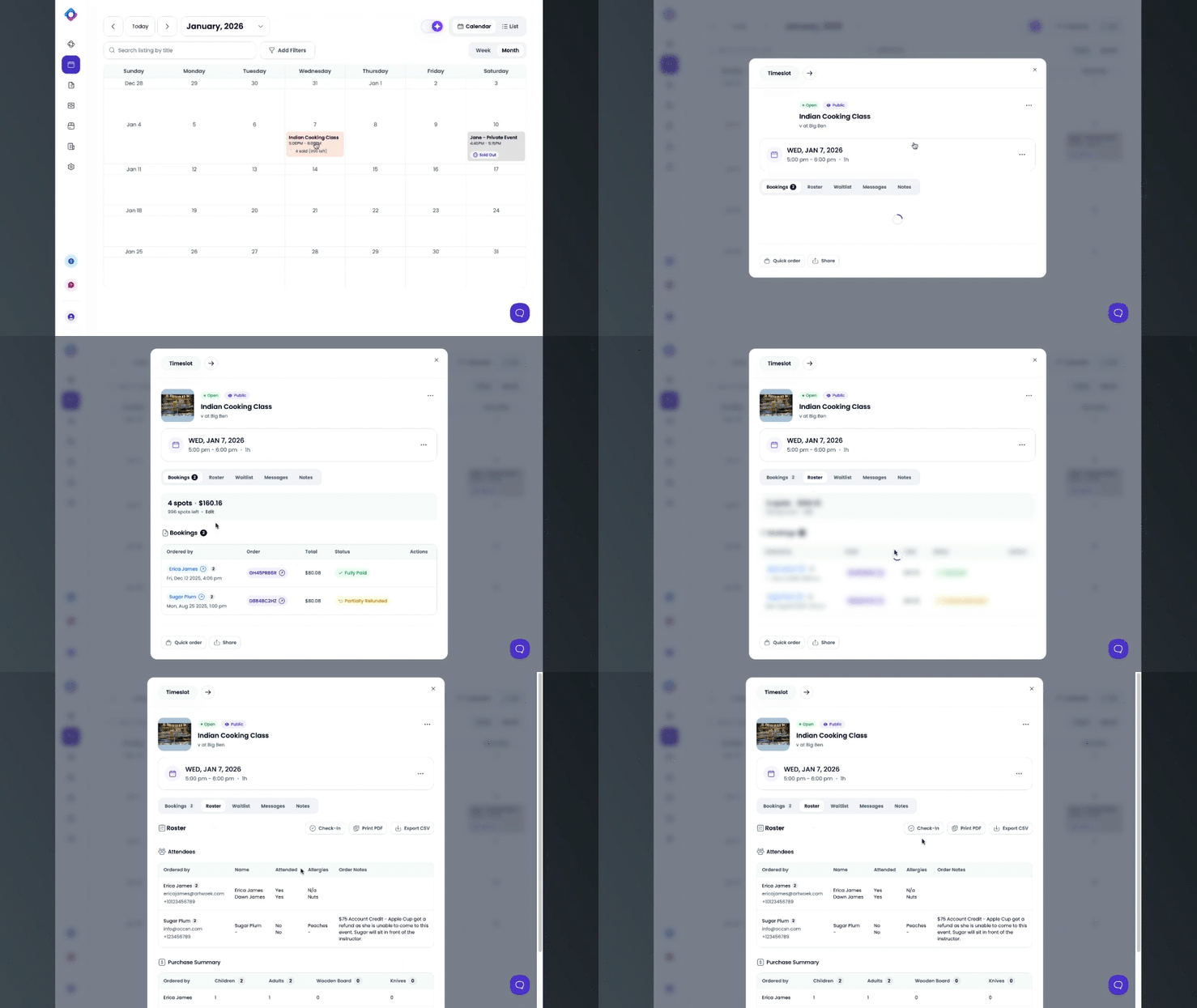
- From your Workspace Calendar, click on the event you want to check in guests for.
- Under the "Roster" tab, locate the "Check-in" button and copy the unique url link.
- Share the link with your staff via text, email, or your preferred communication method.
Your staff can open the link on any phone or tablet - no Occasion account required.
How do staff check in attendees?
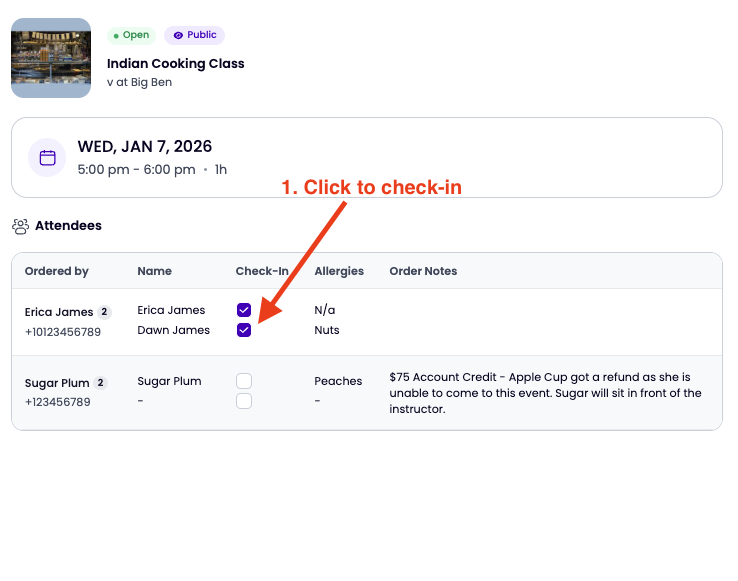
Once your staff opens the Check-in link, they will:
- See the full list of attendees for that time slot.
- Tap on each checkbox next to each attendee's name to mark them as "attended".
-
All updates will immediately appear in your Workspace.
Common Questions
1. Do staff members need an Occasion account to check in guests?
No. Staff can open the Digital Check-in link on their phone or tablet without logging in.
2. Is the Check-in link secure?
Yes. The link is only accessible when you share it. No one can access your attendee information without the unique link.
3. Can I see who has been checked in from my Workspace?
Yes. All check-ins sync immediately to your Workspace, so you can see real-time attendance data without waiting for staff to manually update spreadsheets.
4. What information can staff see when they open the Digital Check-in link?
Staff can see the full list of attendees for that specific time slot. They can mark attendees as "attended" with one tap.